
We talk a lot about designing transfer dies for higher stroke rates – yet it is often the collision check, of all things, that slows us down. The traditional approach using clearance curves is time-consuming, cluttered, and error-prone. But there is a much simpler way. This article shows the path: from the 2D drawing-board solution to the 3D keep-out volume.
The Problem: A 2D Solution to a 3D Problem
The conventional collision check using clearance curves is conceptually a relic of the drawing board – and it shows. Countless curves have to be created for the upper and lower die, and every single one brings the same difficulties with it.
The process is time-consuming: a single change to the part or the transfer curve means rebuilding everything. Export, import, and positioning in CAD are done manually. The reference point is ambiguous and requires experience – an open door for errors. During the subsequent checking and approval, the same problems repeat themselves all over again. And the more curves there are in the model, the more cluttered it becomes: overlapping curves hide exactly the critical spots you actually need to see.
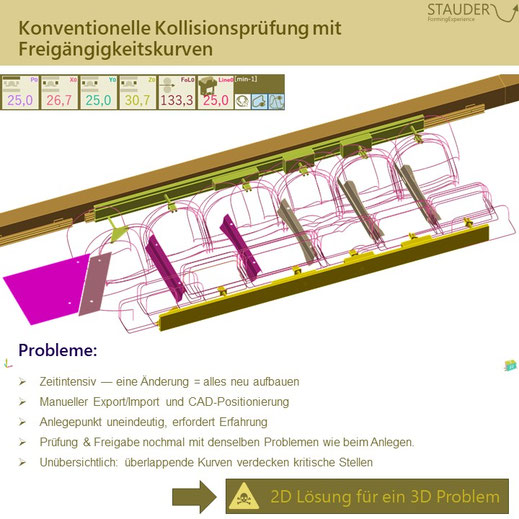
The classic approach – a tangle of dozens of clearance curves. Overlaps hide critical spots, and every change forces a complete rebuild.
The limits of the method become especially clear with more complex motions: pneumatically actuated part tilting, pitch changes, or flipping the part can hardly be represented cleanly with curves. In essence, you are trying to solve a three-dimensional problem with two-dimensional means.
The Solution: 3D Keep-Out Zones as Sweep Volumes
The answer is obvious – it just needs to be thought through in true 3D: instead of many curves, two sweep volumes define the keep-out zones for the die. obviFLOW transforms all elements moved by the transfer along their motion paths and generates two volume geometries from them, covering every critical contour.
The difference in everyday work is enormous. Instead of managing dozens of curves, only two elements need to be positioned – inserted statically into the base model, easily exchangeable, and instantly verifiable. And verifiable by anyone on the team, not just the experienced specialist who knows where the reference point belongs. Collision-free operation simply becomes visible.
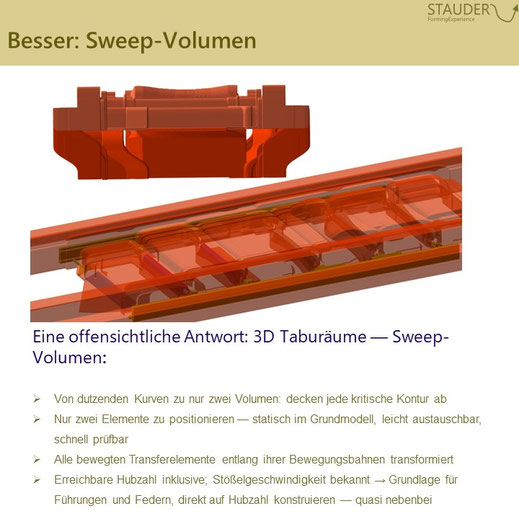
Two solid volumes instead of dozens of curves – the sweep volumes cover all critical contours and make collision-free operation verifiable at a glance.
The Bonus: Stroke Rate and Ram Velocity Included
One aspect makes the sweep volumes particularly valuable: each volume implicitly contains the achievable stroke rate along with the corresponding ram velocity. This provides the ideal basis for designing die components such as guides or springs in a targeted way – you design directly for the target stroke rate, almost as a by-product.
Conclusion
More clarity, faster design, better tool clearance, and ultimately higher press output: with the current version obviFLOW 26_1, all of this can be generated effortlessly. No more juggling countless curves – one small click in the model, one giant leap in the die layout.